How to Log In to Zoccer
Signing in to your Zoccer account is quick. Use the email address and password you created when you registered. If you are returning to the site on the same device and browser, your email may already be pre-filled.
Desktop Login
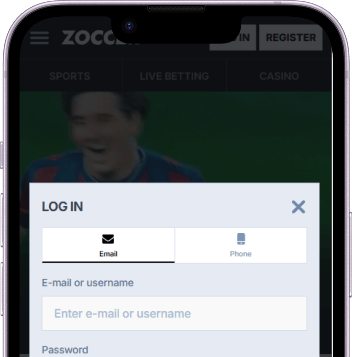
Open the Zoccer website and click the "Log In" button in the top right corner of the page. Enter your registered email address and password, then click "Log In" to access your account. If you have forgotten your password, click the "Forgot your password?" link on the login form to receive a reset email.
Mobile Login
On a phone or tablet, open the Zoccer site in your mobile browser. Tap the "Log In" button, enter your credentials, and tap "Log In." The mobile site is fully responsive - no app download is needed. All games, live betting, bonus management, and withdrawal requests are available through the mobile browser.
Trouble Signing In?
If you cannot log in, try the following before contacting support:
- Check you are entering the correct email address - the one you registered with, not an alias or alternate address.
- Passwords are case-sensitive. Check that Caps Lock is not active.
- Clear your browser cache and cookies, then try again. Outdated cached data can occasionally cause login failures.
- Try a different browser or use a private/incognito window.
- Ensure your internet connection is stable. A dropped connection during login can cause the page to hang.
- If you have forgotten your password, use the password reset option on the login form.
If none of the above resolves the issue, contact customer support via live chat or email at support@zoccer.com. An agent can check the status of your account and help restore access.
No account yet? Sign up here and claim your welcome bonus.
Creating a New Zoccer Account
If you do not have a Zoccer account yet, registration takes around two minutes. The welcome offer is displayed at the top of the sign-up form so you can see exactly what you are getting before you start. There is no download required - the casino runs directly in your browser.
-
Click "Sign Up" on the Zoccer website. The registration button is at the top right of every page. Clicking it opens the registration form.
-
Select your welcome bonus. Choose between the casino welcome bonus (100% up to €500 + 200 Free Spins), the sports welcome bonus (100% up to €100), or the crypto welcome bonus (200% up to 3,000 USDT). You can also skip the bonus if you prefer to play without wagering requirements.
-
Enter your email address and create a password. Use a strong password - a mix of upper and lowercase letters, numbers, and a symbol is recommended. This is how you will log in on every future visit.
-
Fill in your personal details. You will need your full name, date of birth, phone number, home address, country of residence, and preferred currency. These details are required for account verification when you request your first withdrawal.
-
Confirm your account and make your first deposit. Complete the registration form and proceed to the cashier to make your first deposit. The minimum qualifying deposit for the casino welcome bonus is €20. Your bonus and first batch of free spins are credited automatically after the qualifying deposit is confirmed.
What You Can Do With Your Zoccer Account
Once you are logged in, your Zoccer account gives you access to the full platform. Here is what is available from the account area.
13,000+ Games
Access over 13,000 titles across slots, live casino, RNG table games, and crash games. The library includes content from 119 game providers including Pragmatic Play, Playtech, Evolution, Play'n GO, Hacksaw Gaming, Yggdrasil, and more. Filter by provider, category, or use the search bar to find a specific title.
Sports Betting & Live Betting
Access the full sportsbook covering 25+ sports and e-sports with pre-match and in-play betting. Place single bets, accumulators, or use the Bet Builder to construct custom same-game combinations. Live betting is available with a basic live tracker for key events.
Bonus & Promotions Centre
View and activate available promotions including weekly reload bonuses, weekend reloads, live cashback, and sports cashback. Check the status of active bonuses, wagering progress, and pending free spin batches. The bonus page shows all current offers with their terms clearly listed.
Cashier & Payments
Deposit and withdraw using Visa, Mastercard, Revolut, or a range of cryptocurrencies including Bitcoin, Ethereum, Litecoin, USDT, and more. The cashier shows your available balance, pending withdrawals, and transaction history. Minimum deposit is €10 (Bitcoin: €30). Withdrawals are processed within 3 business days.
VIP Dashboard
Check your current VIP level and progress toward the next tier. The VIP programme has 5 levels, each offering higher daily and monthly withdrawal limits, better cashback rates, and - from Level 4 - a personal VIP manager. VIP status is calculated on a rolling 90-day activity basis.
Loyalty Shop & Games
Earn Coins through gameplay and spend them in the Shop for bonus funds. Play the Bonus Crab (interactive claw machine), spin the Wheel of Fortune (1 spin per €100 wagered, up to 3 per day), complete weekly and monthly Challenges, and join Tournaments including the Slot of the Week and Monthly Race.
Account Security
Your Zoccer account holds real money and personal information. Taking a few steps to keep it secure is straightforward and important.
Use a Strong, Unique Password
Your password should be something you have not used on any other site. A strong password combines upper and lowercase letters, numbers, and at least one symbol. Avoid passwords based on your name, date of birth, or anything that could be guessed. If you think your password may have been compromised, change it immediately through your account settings or by using the password reset function on the login page.
Keep Your Login Credentials Private
Zoccer will never ask for your password via live chat or email. If you receive any communication asking for your password, do not respond - contact support immediately to report it. Only log in through the official Zoccer website and do not use shared or public devices to access your account.
Secure Your Email Account
Your registered email address is the key to your Zoccer account. Password reset links are sent to that email. If someone gains access to your email, they can request a password reset and access your casino account. Securing your email with a strong password and, where possible, two-factor authentication protects both your email and your casino account.
Account Locks and Suspicious Activity
If multiple failed login attempts are detected on your account, it will be temporarily locked as a security precaution. This prevents unauthorised access. Contact customer support via live chat or email at support@zoccer.com to have the lock reviewed. You will need to verify your identity before access is restored.
Account Inactivity
Accounts are considered inactive after 180 days without any login or gameplay activity. An inactive account is subject to a €5 per month administrative fee. To avoid this, simply log in and play from time to time. If your account balance falls to zero and the account remains inactive, it will eventually be closed. Contact support if you want to reactivate a dormant account.
Account Recovery
Forgot Your Password?
Click "Forgot your password?" on the Zoccer login form. Enter your registered email address and a reset link will be sent to your inbox. Click the link in the email to create a new password. The reset link is valid for a limited time, so use it promptly after receiving it.
If you do not see the email within a few minutes, check your spam or junk mail folder. Some email providers filter automated messages. If the email does not arrive after 10 minutes, contact support for manual assistance. An agent can verify your identity and help restore access through an alternative method.
Account Locked?
Account locks are applied automatically after multiple failed login attempts, or manually by the security team if suspicious activity is detected on the account. In both cases, contact support via live chat or email at support@zoccer.com. You will be asked to confirm your identity before the lock is reviewed. Do not attempt to create a second account if your account is locked - this will result in both accounts being permanently closed.
Updating Your Personal Details
If you need to update your name, address, date of birth, or contact details, contact support directly. Some changes require re-verification with updated documents, particularly address changes and name corrections. Changes to your registered email address also require verification to prevent unauthorised account takeovers.
Responsible Gambling Tools
Zoccer provides tools to help you manage your gambling and keep it within comfortable limits. These tools can be activated through the support team at any time.
Self-Exclusion via Email
If you want to take a break from gambling at Zoccer, you can request self-exclusion by emailing support@zoccer.com with the subject "Self-Exclusion Request." Specify whether you want a temporary exclusion (and the duration) or a permanent exclusion. Once activated, self-exclusion prevents you from logging in, making deposits, or placing bets for the specified period. Temporary exclusions cannot be reversed early. Permanent exclusions are applied without a set end date.
Withdraw any available balance before sending the self-exclusion request, as access to your account including your balance will be restricted from the moment the exclusion is activated.
Cooling-Off Period
A cooling-off period restricts your account for a shorter set time - typically a few days - without requiring a full self-exclusion. This is useful if you feel you need a short break but intend to return. Contact support via live chat or email to arrange a cooling-off period.
Deposit Limits
Deposit limits cap the amount you can add to your account in a given time period (daily, weekly, or monthly). These are one of the most practical tools for keeping gambling spending under control. Reducing a deposit limit takes effect immediately. Increasing a limit requires a 7-day waiting period before the change is applied. Contact support to set or modify deposit limits on your account.
Keeping Gambling Fun
Gambling is a form of entertainment - it should never be used as a way to earn income or to recover money that has been lost. Set a budget before you play and treat any losses as the cost of entertainment. Take regular breaks during sessions and do not gamble when you are stressed, tired, or under the influence of alcohol. If gambling stops being fun, stop playing and contact support or an external help organisation.
Account & Login FAQ
How do I log in to Zoccer?
Click the "Log In" button at the top right of the Zoccer website. Enter your registered email address and password, then click "Log In." On mobile, the process is the same - open the site in your browser and tap the login button. No app download is required.
What do I need to register a new account?
You will need an email address, a password, your full name, date of birth, phone number, home address, country, and preferred currency. Registration takes around two minutes and there is no download required. The minimum deposit to activate the welcome bonus is €20.
I forgot my password. How do I reset it?
Click "Forgot your password?" on the login form and enter your registered email address. A reset link will be sent to your inbox. Click the link to create a new password. If the email does not arrive within a few minutes, check your spam folder. Contact support if you still cannot access the reset email.
My account has been locked. What should I do?
Account locks are applied after multiple failed login attempts or if the security team detects unusual activity. Contact customer support via live chat or email at support@zoccer.com to have your account reviewed. Do not attempt to open a second account while your original account is locked.
Can I have more than one account?
No. Each player is permitted one account only. Opening multiple accounts violates the terms and conditions and will result in all accounts being closed and any balances being forfeited. If you believe a duplicate account has been created in error, contact support immediately.
How do I change my password?
When logged in, go to your account settings to update your password. Enter your current password, then set a new one. If you cannot log in to change it, use the "Forgot your password?" option on the login page to receive a reset link by email.
Will Zoccer remember my login on my next visit?
Zoccer may pre-fill your email address on the login form if you have visited before on the same device and browser. You will always need to enter your password manually for security. Clearing your cookies or using a private browsing window will require you to enter your full credentials again.
Is there a Zoccer mobile app?
There is no dedicated mobile app. The Zoccer website is fully optimised for mobile browsers on iOS and Android. All features - including 13,000+ games, live sports betting, bonus management, cashier, and account settings - are accessible without an app download. Simply open the site in your mobile browser and log in as normal.
What currencies are supported?
Zoccer supports multiple currencies including EUR, NOK, HUF, PLN, NZD, CAD, USD, CZK, AUD, CHF, and BRL. You select your preferred currency during registration. Currency changes after registration require a request to support and may involve account verification.
How do I request self-exclusion?
Email support@zoccer.com with the subject "Self-Exclusion Request." State whether you want a temporary exclusion (and for how long) or a permanent one. Withdraw any available balance before sending the request, as account access - including your balance - will be restricted once the exclusion is applied.
What happens to my account if I do not log in for a long time?
Accounts that have not had any login or gameplay activity for 180 days are classified as inactive. An administrative fee of €5 per month is applied to inactive accounts until the balance reaches zero. To avoid this, log in and play periodically. Contact support if you want to reactivate an inactive account.
How do I update my personal details on my account?
Contact customer support via live chat or email at support@zoccer.com to update personal details such as your address, phone number, or email address. Some changes require re-verification with updated documents. Name corrections also require ID documentation confirming the correct name.