How to Reach Zoccer Support
Zoccer provides four support channels so you can always get help when you need it. Whether you have a quick question about a promotion, need to submit documents for verification, or want to report a technical problem, our team is ready to help 24 hours a day, 7 days a week.
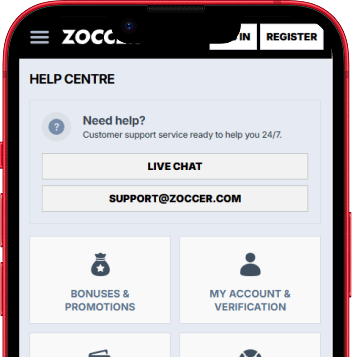
24/7 Live Chat
The fastest way to reach us. Click the chat icon on any page and you will be connected to a live agent. Response times are typically under two minutes. Live chat is available in all 12 supported languages. Use it for urgent issues, quick questions about bonuses, and anything that needs a fast answer.
Email Support
For detailed enquiries, document submissions, and cases that require a written record, email is the right channel. Send your message to support@zoccer.com and include your username or registered email address. Our team aims to respond within 24 hours.
Help Centre & FAQ
The Help Centre covers the most common questions about deposits, withdrawals, bonuses, account settings, and responsible gambling tools. Many issues can be resolved without contacting support directly. Browse the FAQ sections throughout the site before reaching out.
Telegram Channel
Zoccer maintains an official Telegram channel where news about promotions, platform updates, and scheduled maintenance is announced. You can also use Telegram to send support messages. Check the casino website for the current Telegram link.
Send your account username or registered email address with every enquiry so the team can locate your account quickly.
| Channel | Availability | Response Time | Best For |
|---|---|---|---|
| Live Chat | 24/7 | Under 2 minutes | Urgent issues, bonus questions, deposit problems |
| Email (support@zoccer.com) | 24/7 | Up to 24 hours | Document submissions, complaints, complex cases |
| Telegram | 24/7 | Varies | Announcements, general messages |
| Help Centre / FAQ | Always available | Instant | Self-service answers to common questions |
| Phone | Not available | - | - |
Support in 12 Languages
Zoccer serves players across Europe and beyond, and the support team reflects that. Live chat and email support are available in all 12 languages supported by the platform. You do not need to write in English - use whatever language is most comfortable for you.
The 12 supported languages are: English, German, Spanish, Finnish, French, Hungarian, Norwegian, Polish, Portuguese, Italian, Czech, and Arabic. When you open live chat, the system will attempt to match you with an agent in your preferred language. For email, simply write in your language and the team will respond in kind.
This multilingual capability means players from Germany, Norway, Poland, Portugal, and across the Arabic-speaking world can get the same level of support as English-speaking players. Bonus terms, promotional details, and account guidance are all communicated clearly regardless of the language you choose.
What Our Support Team Can Help With
Our customer support team handles a wide range of topics. Below are the most common areas where players contact us for assistance.
Account & Registration
Help with creating an account, updating personal details, resetting passwords, and resolving login issues. If your account is locked or access is restricted, contact support and an agent will review the situation and advise on next steps.
Deposits & Payments
Assistance with failed deposits, payment method questions, and transaction status. Zoccer accepts a wide range of deposit methods including Visa, Mastercard, Revolut, Bitcoin, Ethereum, Litecoin, USDT, and several other cryptocurrencies. If a deposit does not appear in your balance, support can trace the transaction.
Withdrawals & Payouts
Questions about withdrawal processing times, pending requests, and declined payouts. Standard processing takes up to 3 business days. Before withdrawing, a 1x deposit rollover is required. Minimum withdrawal amounts vary by method - starting from €10 for most options. For more details, visit the Withdrawal page.
Bonuses & Promotions
Clarification on bonus terms, wagering requirements, activation of offers, free spin deliveries, and cancellation of active bonuses. Support can explain eligibility conditions for any current promotion, including the weekly reload, weekend reload, cashback offers, and VIP-specific rewards.
Verification & KYC
Guidance on document submission, what documents are accepted, current verification status, and expected timelines. The verification process typically takes 24-48 hours once all required documents are received. Support can flag any issues with submitted documents before the review team processes them.
Technical Issues
Help with games not loading, website errors, mobile browser compatibility issues, and audio or display problems. Support can troubleshoot common technical issues and escalate confirmed bugs to the development team. Providing your browser type and device model helps speed up diagnosis.
VIP & Loyalty Programme
Questions about VIP levels, progression, cashback rates, personal VIP manager access, and withdrawal limit increases. The VIP programme has 5 levels, each with higher withdrawal limits and better cashback rates. Support can check your current level and explain what is needed to advance.
Responsible Gambling Tools
Requesting a self-exclusion, setting deposit limits, or taking a cooling-off break. These tools are managed through the support team. Contact support via live chat or email to activate any responsible gambling measure on your account.
Sports Betting
Questions about unsettled bets, void markets, cash-out issues, and accumulator settlement. Support can check the status of any bet and explain why a market has been settled in a particular way. Live betting disputes are reviewed against official event records.
How to Contact Support - Step by Step
Getting help is straightforward. Follow these steps to reach the right channel for your situation and get a resolution as quickly as possible.
-
Check the FAQ first. Many common questions about bonuses, withdrawals, verification, and account settings are answered in the FAQ sections throughout the site. If your question is about a specific promotion, the bonus page usually contains the full terms.
-
Open live chat for urgent issues. If your issue is time-sensitive - a failed deposit, a locked account, or a disputed bet - open live chat immediately. Click the chat icon on any page. A live agent will respond within minutes. Have your account email or username ready before you start the conversation.
-
Send an email for detailed or document-heavy cases. If your issue requires document uploads, requires a written record, or involves a formal complaint, email support@zoccer.com. Write a clear subject line (for example: "Withdrawal pending - [your username]") and describe the issue in full detail. Attach any screenshots or documents that support your case.
-
Follow up if you do not hear back. Email responses are typically sent within 24 hours. If you have not received a reply after 24 hours, send a follow-up email referencing your original message, or contact live chat and provide the date and subject of your email so an agent can locate it.
-
Escalate unresolved issues. If your issue is not resolved to your satisfaction after speaking with a front-line agent, ask for your case to be escalated to a senior agent or the compliance team. Provide all previous correspondence and any reference numbers.
What to Expect From Each Support Channel
Live Chat
Live chat is staffed 24 hours a day and is the primary channel for most players. When you open a chat session, you will first be asked to describe your issue briefly. This helps the system route you to the right team. Most standard queries - bonus activation, deposit confirmation, account details - are resolved within a single chat session. If your issue requires investigation (for example, checking a transaction on the payment provider's side), the agent may ask for your email address to follow up once the information is available.
All live chat sessions are logged. If you need a transcript of your conversation, ask the agent at the end of the session and they can arrange to send it to your registered email address.
Email Support
Email is best suited for cases that require documentation, a written record of decisions, or detailed investigation. When sending an email, always include:
- Your registered username or email address
- A clear description of the issue, including dates and amounts where relevant
- Any supporting screenshots or documents (attach directly, do not use external links)
- Your preferred language if not English
The team will acknowledge your email and provide an estimated resolution timeframe. For document verification requests, the review time is 24-48 hours once all documents have been received. For payment disputes or complex account reviews, resolution may take up to 10 business days.
Help Centre & FAQ
The Help Centre is the fastest way to get answers to standard questions. Before contacting support, check the FAQ sections on the relevant page - the Bonuses page covers wagering questions, the Withdrawal page covers payout timelines and limits, and the responsible gambling section on this page explains self-exclusion. If the answer is not there, contact live chat.
Telegram Channel
The official Zoccer Telegram channel is used primarily for announcements: new promotions, platform updates, scheduled maintenance windows, and bonus codes. Messages sent to the Telegram channel will be reviewed, but for account-specific issues, live chat or email will always get a faster and more detailed response.
Getting the Most From Your Support Request
A few practical steps will help the support team resolve your issue faster and reduce back-and-forth.
-
Have your account details ready. Your registered email address or username helps support locate your account without delay. If the issue involves a specific transaction, note the transaction reference number, amount, date, and payment method before contacting us.
-
Describe the problem clearly and specifically. Explain what happened, when it happened, and what you expected to happen. Vague descriptions like "my withdrawal did not work" are harder to investigate than specific ones like "I requested a withdrawal of €200 via bank transfer on 22 March and the status has not changed for 4 days."
-
Attach screenshots where possible. For technical issues, payment errors, or bonus disputes, a screenshot of the relevant screen (error message, transaction history, bonus terms) helps the team identify the root cause quickly.
-
Use the right channel for the situation. For urgent issues - a locked account, a failed deposit that you need to resolve before a promotion expires - use live chat. For formal complaints, document submissions, or anything that needs a paper trail, email support@zoccer.com.
-
Be clear about what you need. If you want a specific outcome - a bonus re-credited, a withdrawal re-processed, a verification document status check - say so clearly. This helps agents understand what resolution looks like for you.
Complaints Procedure & Dispute Resolution
Zoccer takes complaints seriously. If you are not satisfied with the outcome of a support interaction, you have the right to escalate your complaint through the formal procedure described below.
Step 1 - Contact Support Directly
Before a formal complaint is raised, contact the support team via live chat or email at support@zoccer.com. Describe your issue in full and give the team an opportunity to resolve it. Most issues are resolved at this stage. Keep a note of the date and the name of the agent you spoke with.
Step 2 - Request Escalation to a Senior Agent
If the response from the front-line team does not resolve your complaint, ask for it to be escalated to a senior support agent or the compliance department. Provide your case reference number and a summary of the previous interaction. Senior agents have more authority to review decisions on bonuses, account restrictions, and payment disputes.
Step 3 - Formal Written Complaint
If escalation does not resolve the matter, you may submit a formal written complaint to support@zoccer.com with the subject line "Formal Complaint - [your username]." Include a full account of the issue, all previous correspondence, and the specific outcome you are requesting. The compliance team will acknowledge your complaint within 5 business days and provide a full written response within 10 business days.
Response Timelines
For disputes requiring investigation - payment discrepancies, bonus calculation reviews, account history checks - Zoccer commits to providing a written response within 10 business days of receiving all relevant information. If additional information is needed from your side, the clock pauses until that information is received.
External Dispute Resolution
If you remain unsatisfied after the formal complaint process, you may seek assistance through independent dispute resolution services or the casino's licensing authority. Details of the licensing authority and available escalation paths are set out in the Terms and Conditions. We recommend exhausting the internal complaints procedure first, as external processes typically require evidence that the internal route has been followed.
Identity Verification (KYC) Process
Zoccer is required to verify the identity of players before processing withdrawals and, in some cases, after reaching certain deposit thresholds. This is a standard anti-money laundering requirement and applies to all licensed online casinos. The process is straightforward and the support team will guide you through it if needed.
What Documents Are Required
- Proof of Identity - a valid government-issued document. Acceptable forms are: passport, national identity card, or full driving licence. The document must be current (not expired) and must show your full name and date of birth clearly.
- Proof of Residence - a document showing your full name and current home address issued within the last 3-6 months. Acceptable forms include a utility bill (gas, electricity, water), bank statement, credit card statement, or tenancy/rental agreement. PO Box addresses are not accepted.
- Payment Method Ownership - confirmation that the payment method you use belongs to you. For card payments, a photo of the card (with the middle 8 digits hidden) may be required. For bank transfers, a bank statement or account summary may be needed.
- Transaction History - in some cases, the compliance team may request 1-3 months of bank statements or payment account history to verify the source of funds. This is more common for higher-volume players.
How to Submit Documents
Documents can be submitted directly via the account verification section in your profile, or by emailing them to support@zoccer.com. When emailing, use "KYC Documents - [your username]" as the subject line to ensure your submission is routed to the verification team immediately. Acceptable file formats are JPG, PNG, and PDF. Each file should be under 10 MB.
How Long Does Verification Take
The verification team reviews submitted documents within 24-48 hours in most cases. If there is an issue with a document - for example, if it is blurry, expired, or does not match the details on your account - the team will contact you by email to request a replacement. You have 30 days from the date of your first withdrawal request to complete verification. Withdrawals will be processed once verification is approved.
Common Verification Issues
- Documents that are too dark or blurry to read - ensure all four corners of the document are visible and the image is in focus
- Proof of address documents older than 6 months - these are not accepted; use a more recent document
- Name on the document does not match the name on the account - contact support to update your account details if there is a discrepancy
- Expired identity documents - expired passports and driving licences are not accepted; use a valid document
If you have questions about what documents to submit or the status of your verification, live chat is the fastest way to get an answer. The support team can check your verification status in real time and advise on what is still needed.
Common Issues and How to Resolve Them
Below are the issues that players most frequently contact support about, along with the quickest path to resolution.
Deposit Not Showing in Balance
If you have made a deposit and the funds have not appeared in your account within 10 minutes, first check your payment provider's account to confirm the transaction was processed on their side. If the funds left your payment account but have not arrived at Zoccer, contact live chat with the exact amount, payment method, and the time of the transaction. For cryptocurrency deposits, check the blockchain confirmation count - deposits typically require a minimum number of confirmations before they are credited.
Withdrawal Pending for Longer Than Expected
Standard withdrawal processing takes up to 3 business days. Cryptocurrency withdrawals are often faster. Before withdrawals can be processed, account verification must be complete and the 1x deposit rollover requirement must be met. If your withdrawal has been pending for longer than 3 business days and your account is verified, contact support via email at support@zoccer.com with your withdrawal reference number.
Bonus Not Credited After Deposit
Most bonuses at Zoccer are credited automatically after a qualifying deposit. If a bonus was not credited, check that you selected the offer before confirming the deposit - bonuses cannot be applied retroactively in most cases. Also confirm that the deposit met the minimum qualifying amount for the specific promotion. Contact live chat immediately if you believe a bonus was not applied correctly, as some promotions have a short window for corrections.
Free Spins Not Appearing
The welcome package includes 200 free spins delivered in batches of 20 per day over 10 days. If your daily batch has not appeared, check that any previous free spin winnings have been wagered through (40x wagering requirement). Contact live chat if a daily batch is missing after you have confirmed the wagering requirement has been met.
Game Not Loading
If a game is not loading, try clearing your browser cache and refreshing the page. Check that your internet connection is stable. Some games have geographic restrictions that may prevent access in certain regions. If a specific game repeatedly fails to load, contact support with the game name and your browser and device details so the issue can be investigated.
Account Locked or Suspended
Accounts can be locked for security reasons (multiple failed login attempts), during a verification review, or if a potential policy breach has been flagged. Contact support via live chat or email immediately. An agent will explain the reason for the lock and advise on the steps needed to restore access. Do not attempt to create a new account if your existing account is locked - this may result in a permanent ban.
Responsible Gambling & Self-Exclusion
Zoccer takes responsible gambling seriously. If you feel that your gambling has become a problem or you simply want to take a break, the support team can help you set up protective measures on your account. These tools are there to be used - do not hesitate to ask.
Self-Exclusion
Self-exclusion allows you to block access to your Zoccer account for a set period or permanently. During a self-exclusion period, you will not be able to log in, place bets, or receive promotional communications. To request self-exclusion, contact support via live chat or send an email to support@zoccer.com with the subject "Self-Exclusion Request." Specify whether you want a temporary exclusion (and for how long) or a permanent exclusion. Self-exclusion is activated promptly once the request is received and confirmed. Temporary exclusions cannot be reversed before the set period expires.
Before requesting self-exclusion, withdraw any available balance from your account, as access will be restricted during the exclusion period.
Cooling-Off Period
If you want to pause your gambling activity without permanently closing your account, a cooling-off period can be applied. This restricts access to your account for a set number of days and prevents you from making deposits. Contact support to arrange this.
Deposit Limits
Setting deposit limits is one of the most effective responsible gambling tools available. You can request daily, weekly, or monthly deposit limits by contacting support. Once set, limits can only be increased after a 7-day cooling-off period. Reducing a limit takes effect immediately.
Self-Assessment
If you are unsure whether your gambling habits are becoming a problem, these questions may help you evaluate your situation honestly:
- Are you spending more than you can afford to lose?
- Do you borrow money or use bill money to fund gambling?
- Do you chase losses, depositing more in an attempt to win back what you have lost?
- Do you feel anxious, irritable, or preoccupied when you are not gambling?
- Have you lied to family or friends about how much time or money you spend gambling?
- Has gambling caused problems at work, school, or in your relationships?
If several of these apply to you, speaking to a specialist organisation can help. Free, confidential support is available from organisations including GamCare, Gambling Therapy, and Gamblers Anonymous.
Support FAQ
Is Zoccer customer support available 24/7?
Yes. Live chat and email support are both available 24 hours a day, 7 days a week, including weekends and public holidays. The Telegram channel is also monitored around the clock, though live chat and email are faster for account-specific issues.
What is the support email address for Zoccer?
You can reach Zoccer support by email at support@zoccer.com. Include your username or registered email address, a clear description of the issue, and any relevant screenshots or documents. The team aims to respond within 24 hours.
How quickly does live chat respond?
Live chat agents typically respond within two minutes. During peak periods the wait may be slightly longer, but the chat window will show your position in the queue. Live chat is the fastest support channel for urgent issues.
In which languages is support available?
Zoccer offers support in 12 languages: English, German, Spanish, Finnish, French, Hungarian, Norwegian, Polish, Portuguese, Italian, Czech, and Arabic. You do not need to write in English - use whichever language you are most comfortable with and the team will respond accordingly.
Can support help me cancel or change an active bonus?
Yes. If you want to cancel an active bonus, contact support via live chat or email. Be aware that cancelling a bonus removes the bonus amount and any winnings generated while the bonus was active. The support team will confirm the exact impact before processing the cancellation.
How long does KYC verification take?
The verification team reviews submitted documents within 24-48 hours in most cases. If there is an issue with a document - for example it is unclear or expired - you will be contacted by email to provide a replacement. You have 30 days from your first withdrawal request to complete verification.
What documents are needed for KYC verification?
You will need a valid government-issued ID (passport, national ID card, or driving licence) and proof of your current address dated within the last 3-6 months (utility bill, bank statement, or rental agreement). Depending on your activity level, proof of payment method ownership or source of funds may also be requested.
How do I raise a formal complaint?
Email support@zoccer.com with the subject "Formal Complaint - [your username]." Include a full description of the issue, all previous correspondence, and the outcome you are requesting. The compliance team will acknowledge your complaint within 5 business days and provide a written response within 10 business days.
How do I request self-exclusion?
Contact support via live chat or send an email to support@zoccer.com with the subject "Self-Exclusion Request." Specify whether you want a temporary exclusion and for how long, or a permanent exclusion. Withdraw any available balance before requesting self-exclusion, as account access will be restricted immediately once the exclusion is activated.
What happens if my issue is not resolved by the first agent?
Ask for your case to be escalated to a senior support agent or the compliance department. Provide any reference numbers from the original interaction and a summary of the issue. If the escalated response is still unsatisfactory, you can submit a formal written complaint as described above.
Can I track the status of a withdrawal through support?
Yes. Contact live chat with your withdrawal reference number and the date of the request. The agent can check the current status and advise on the expected processing timeline. Standard withdrawals take up to 3 business days. If your account is fully verified and the rollover requirement is met, most withdrawals are processed faster.
Does Zoccer have phone support?
No. Zoccer does not offer telephone support. All support is handled through live chat, email at support@zoccer.com, and the Telegram channel.